Custom Grid Components
We can make our own “custom grid components” using Python 3 Script components. This page contains some (hopefully) interesting exercises in making customized grids.
Note
You can get a completed Grasshopper document containing implementations for
everything on this page here.
Parallelogram Grids
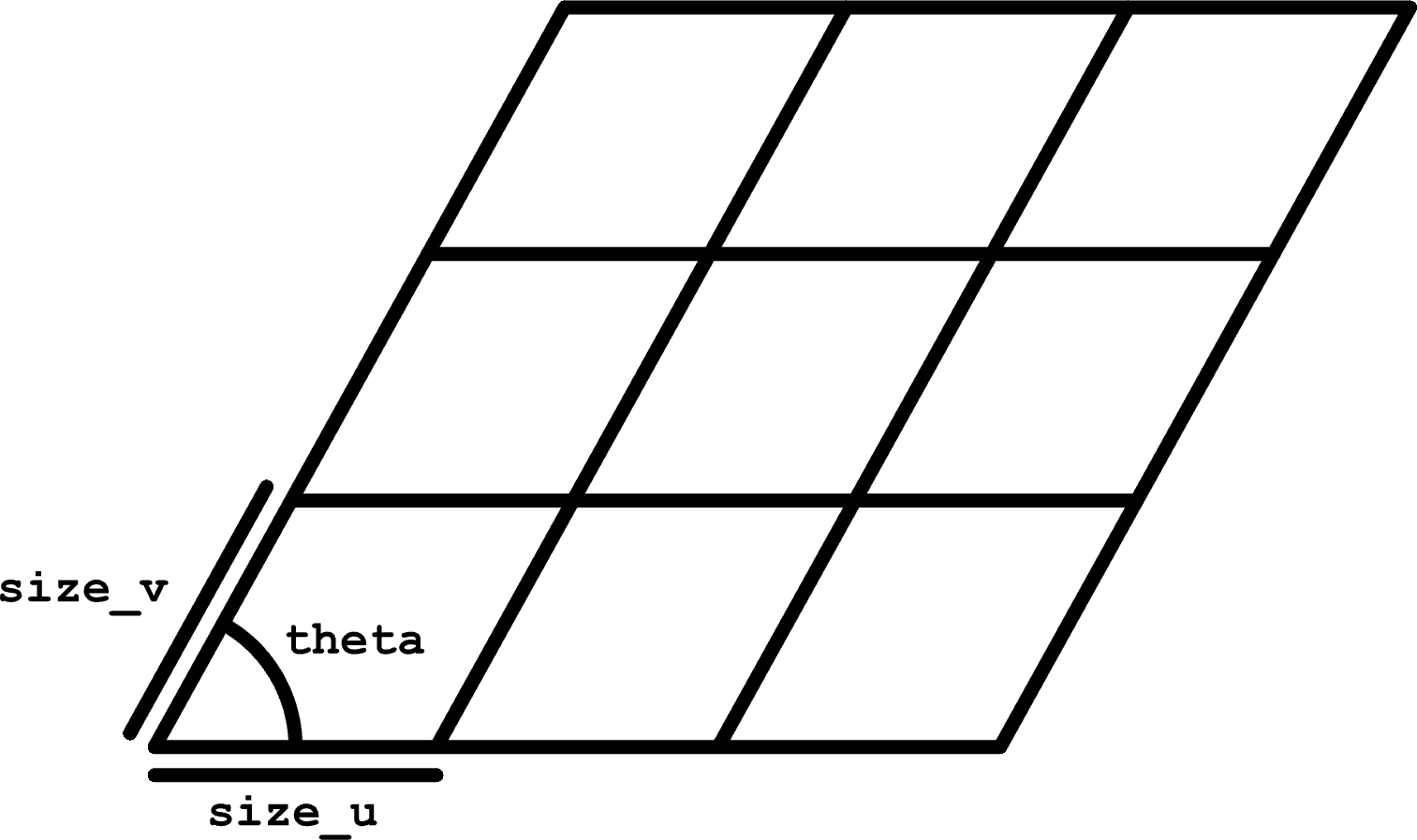
We can make our own parallelogram grids, extending the Rectangular component to slanted grids. Of course, this could be done by shearing the cells or points created by the Rectangular component, but using a Python 3 Script component is a pretty easy way to make this work.
Inputs
size_u, type-hinted as floatsize_v, type-hinted as floatextent_u, type-hinted as intextent_v, type-hinted as inttheta, type-hinted as float
Outputs
cells, type-hinted as Polylinepoints, type-hinted as Point3d
Source Code
from math import cos, sin, radians

import ghpythonlib.treehelpers as th
import rhinoscriptsyntax as rs
from Rhino.Geometry import Vector3d

theta = radians(theta)

u_basis = size_u * Vector3d(1, 0, 0)
v_basis = size_v * Vector3d(cos(theta), sin(theta), 0)

# Generate points
points = []
for u in range(extent_u + 1):
    row = []
    for v in range(extent_v + 1):
        row.append(u * u_basis + v * v_basis)
    points.append(row)

# Generate cells
cells = []
for u in range(extent_u):
    row = []
    for v in range(extent_v):
        row.append(rs.AddPolyline(
            [
                points[u][v],
                points[u + 1][v],
                points[u + 1][v + 1],
                points[u][v + 1],
                points[u][v]  # repeat the first point to make a closed loop
            ]
        ))
    cells.append(row)

points = th.list_to_tree(points)
cells = th.list_to_tree(cells)
Generic Hexagonal
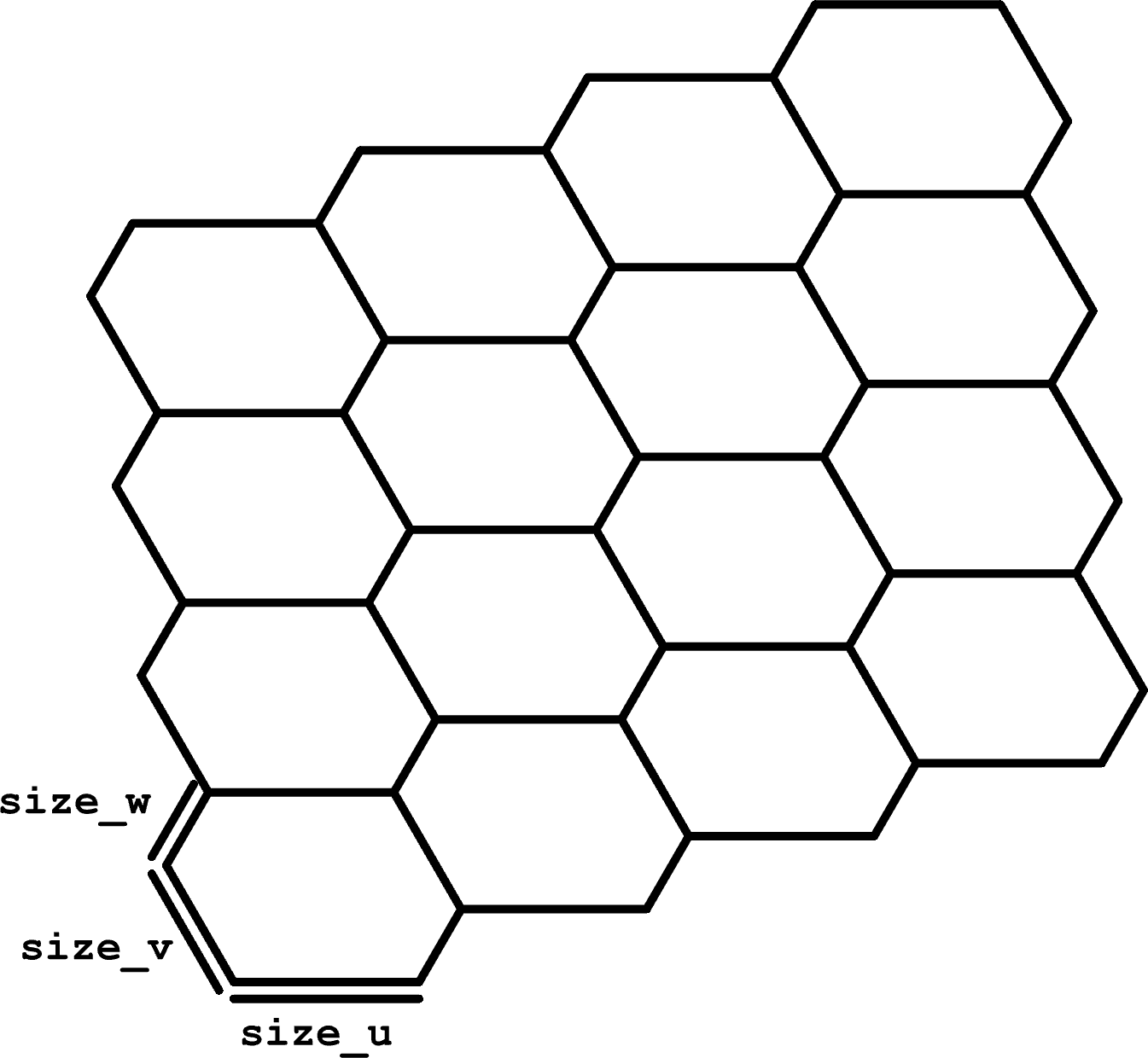
We can generalize the Hexagonal component to vary the lengths of the 3 pairs of parallel sides on each hexagon. For this type of grid, we don’t care as much about the corner points of the grid because, as in Hexagonal, attempting to index the grid points isn’t as straightforward as it is with a rectilinear grid.
To create this type of grid, it’s easier to use a basis with more than 2 vectors in order to find the corners of the cells, then use the corners of the cells to compute their centroids.
Inputs
size_u, type-hinted as floatsize_v, type-hinted as floatsize_w, type-hinted as floatextent_u, type-hinted as intextent_v, type-hinted as intextent_w, type-hinted as int
Outputs
cells, type-hinted as Polylinepoints, type-hinted as Point3d
Source Code
from math import cos, sin, pi

import ghpythonlib.treehelpers as th
import rhinoscriptsyntax as rs
from Rhino.Geometry import Vector3d

u_basis = size_u * Vector3d(1, 0, 0)
v_basis = size_v * Vector3d(cos(-pi / 3), sin(-pi / 3), 0)
w_basis = size_w * Vector3d(cos(pi / 3), sin(pi / 3), 0)

# Generate cells and points in tandem
cells = []
points = []
for i in range(extent_right):
    cell_row = []
    point_row = []
    for j in range(extent_up):
        west_corner = i * (u_basis + w_basis) + j * (w_basis - v_basis)
        corners = [
            west_corner,
            west_corner + v_basis,
            west_corner + v_basis + u_basis,
            west_corner + v_basis + u_basis + w_basis,
            west_corner + u_basis + w_basis,
            west_corner + w_basis,
            west_corner
        ]
        cell_row.append(rs.AddPolyline(corners))
        point_row.append(sum(corners[:-1], start=Vector3d(0, 0, 0)) / 6)
    cells.append(cell_row)
    points.append(point_row)

cells = th.list_to_tree(cells)
points = th.list_to_tree(points)
Generic Regular Monotilings
In general, you can use a strategy similar to the one we used for the hexagonal grid to generate any regular tiling using a monotile. We need to be able to identify the vectors used in the construction of the monotile.

The monotile of choice.
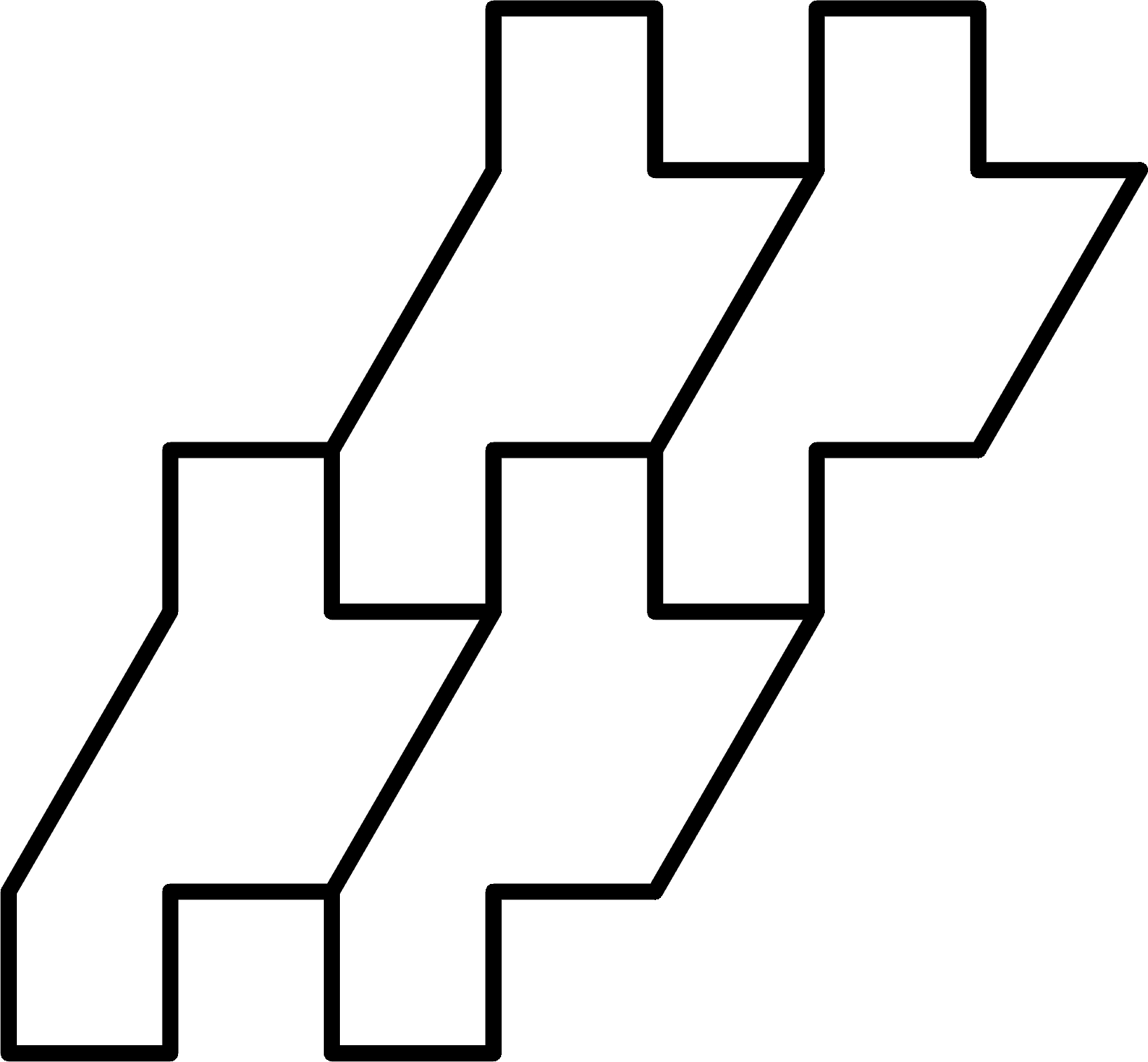
How this monotile tiles.

The monotile of choice.
How this monotile tiles.
We can choose a start point on the monotile, create the remaining points by adding these vectors, and identify which point makes the start point on a neighbor tile. Starting at the bottom of the left slanted line, this monotile can be created by chaining together the following vectors:
Computing the Vectors for Any Monotile
I specifically chose these vectors to make an interesting shape and tiling, but you could start with a regularly tiling monotile and calculate the vectors needed after the fact, too.
To do this, create a Python 3 Script component with an input called monotile,
type-hinted as Polyline. Pipe a Curve input set to your monotile polyline to
monotile. Place points at the start point of your monotile and the location
of the next tile to the right and the next tile up from the initial monotile
(see the example image). Set 3 point inputs to these points and pipe them to
Point3d inputs called start, right_start, and up_start, respectively.
Make an output called path, type-hinted to Vector3d, and two called right_index
and up_index, type-hinted to int.
Pasting the following code into the script block, path should be a list of
vectors suitable to construct your monotile. right_index and up_index
will be set to the indices of the points in the path where the tile to the right
and up will start.
from Rhino.Geometry import Polyline, Point3d, Vector3d

start_index: int = monotile.FindIndex(lambda x: start.EpsilonEquals(x, 1e-6))
right_index: int = monotile.FindIndex(lambda x: right_start.EpsilonEquals(x, 1e-6))
up_index: int = monotile.FindIndex(lambda x: up_start.EpsilonEquals(x, 1e-6))

points = list(monotile)
points = points[start_index:] + points[:start_index]
right_index -= start_index
if right_index < 0:
    right_index += len(points)
up_index -= start_index
if up_index < 0:
    up_index += len(points)

path = []
for i in range(1, len(points)):
    path.append(points[i] - points[i - 1])
path.append(points[-1] - points[0])
Assuming you have a path of vectors corresponding to each step in the path and the indices corresponding to the steps in the path where the tiles to the right and above start, you can create a new Python 3 Script with the following setup:
Inputs
extent_right, type-hinted as intextent_up, type-hinted as intpath, type-hinted as Vector3d, set to List Accessright_index, type-hinted as intup_index, type-hinted as int
path, right_index, and up_index be piped directly from the outputs of
the path calculation script component. Alternatively,
you can enter them directly in panels.
Outputs
cells, type-hinted as Polyline
Source Code
import ghpythonlib.treehelpers as th
import rhinoscriptsyntax as rs
from Rhino.Geometry import Vector3d

cumulative_vectors = [Vector3d(0, 0, 0)]
for i, step in enumerate(path):
    cumulative_vectors.append(cumulative_vectors[i] + step)

basis_right = cumulative_vectors[right_index]
basis_up = cumulative_vectors[up_index]

cells = []
for i in range(extent_right):
    row = []
    for j in range(extent_up):
        start_point = i * basis_right + j * basis_up
        points = [
            start_point + vector
            for vector in cumulative_vectors
        ]
        row.append(rs.AddPolyline(points))
    cells.append(row)

cells = th.list_to_tree(cells)